



Learn From Experts:

WordPress & AI Integration

WE BELIEVE IN SHARING

KNOWLEDGE AND MAKING

NEW SQUAD

READY FOR FUTURE

  • Exposure to Industry processes
  • Live International Projects exposure
  • Learn & work with Professional
  • Affordable Fees
  • Choose your comfort : Online / Offline classes
  • Training Certificate – Yes
  • Gain Knowledge, Not Just Certificates

Advanced WordPress Training with AI certificate in Zirakpur

Tired of YouTube tutorials that go nowhere?

No more tab-hopping, No more confusion.

That “WordPress training near me” search finally paid off.

Our WordPress training in Zirakpur, at Squad Industrial Training, gives you a structured path — from zero to certified — with AI tools baked right in.

  • One program.
  • One certificate.
  • Unlimited earning potential.

Student Benefits

Anyone Can learn

Anyone Can learn IT / Non IT

No-Bookish-Knowledge

No Bookish Knowledge Only Practical Trainings

Instant Doubt Support

Instant Doubt Support 9AM to 6pm

Real-IT-Experts

Learn From IT Experts Not Just Teachers

Affordable-Fees

Affordable Fees Quality Training

Flexible-Learning

Flexible Learning Online / Offline

Get-Certified

Get Certified with Real Skills

Crack Real Interviews

Crack Real Interviews with Mock Practice

Real Skill Building

No Shortcuts Only Real Skill Building

Build Your Own Portfolio

Serious Enough Build Your Own Portfolio

What You Will Excel in

Whether you searched for WordPress training near me or already knew about our WordPress training in Zirakpur,
here’s exactly what you’re walking away with:

  • What is the WordPress Dashboard? Learn the WordPress dashboard, admin bar, screen options, AI workflow integration, Quick Draft, WordPress News, and sidebar navigation.
  • Website Templates/Themes: Explore AI-based theme ideas, website templates, smart design concepts, and theme selection to create attractive and user-friendly websites.
  • Creating New Pages and Posts: Plan content with AI, create new pages and posts, refine content using AI, and develop structured website content efficiently.
  • What Are Posts in WordPress?: Learn to create, publish, edit, and delete posts while using post formats, AI blog title ideas, and AI content enhancement.
  • What Are WordPress Categories & Tags? Create and manage categories and tags, organize content, assign posts, use recommendations, and discover topics and keywords with AI.
  • WordPress Media Library: Manage media uploads, create images with AI, upload files while editing content, delete media, generate alt text, and edit image metadata.
  • What Are Pages in WordPress? Create, publish, edit, and delete pages while using AI for content ideas and refinement and learning the WPBakery page editor.
  • What Are Comments in WordPress? Enable or disable comments, edit and moderate discussions, and use AI-assisted comment moderation to manage website interactions.
  • WordPress Users & User Roles: Understand WordPress user roles, manage users, and edit or delete accounts according to the access requirements of your website.
  • WordPress Backup & Backup Management: Learn to back up WordPress root files manually and manage backups to protect important website data and maintain reliable recovery options.
  • WordPress Updates & Speed Optimization: Understand WordPress updates, performance analysis, basic optimization, speed best practices, and performance optimization strategies.
  • WooCommerce Setup & Configuration: Learn WooCommerce installation, store setup, general & product settings, accounts, privacy, emails, pages, advanced settings, and webhooks.
  • Products & Inventory: Create and manage products, descriptions, inventory, downloadable and variable products, images, download directories, and store features.
  • Payments, Shipping & Orders: Configure payment options, taxes, shipping, coupons, manage orders & refunds, and use WooCommerce reports for store management.
  • WooCommerce AI & Customization: Use the WooCommerce AI Product Advisor, AI-assisted product content and images, WooCommerce Customizer, webhooks, and integrations.
  • WooCommerce Features & Store Management: Configure WooCommerce features, product setup, customer settings, store functionality, and management tools for running an online store.

Still unsure which training is right for you?
Connect with us today and get clear guidance — absolutely free.

What Our Students Have to Say!

slide2
slide3
slide4
slide5
slide6
slide7
slide8
slide9
slide10

Your Learning Journey

1 Enroll in Training
2 Learn with Experts
3 Work on Live Projects
4 Build Your Portfolio
5 Real-Time Mock Interview

Unlock Your Full Learning Potential

Features training-logo YouTube Other Platforms
Affordable check check cross
Live Doubt Solving check cross cross
Flexible Learning Online / Offline check cross cross
Dedicated Projects check cross cross
Certification check cross check
Build Your Own Portfolio check cross cross
Mock Interviews Practice check cross cross

Instant Doubt Solving

Doubt Solving Chat

Doubts Solved within 15 minutes

Ask your doubts anytime between 9 AM and 6 PM and get them resolved within 15 minutes.

Doubt Solving Read

Every doubt matters. Get personal attention.

We give Personalized guidance that keeps you moving forward without confusion.

Anyone Can learn

Certify your Learning

Complete the training with assignments, and request your training completion certificate.
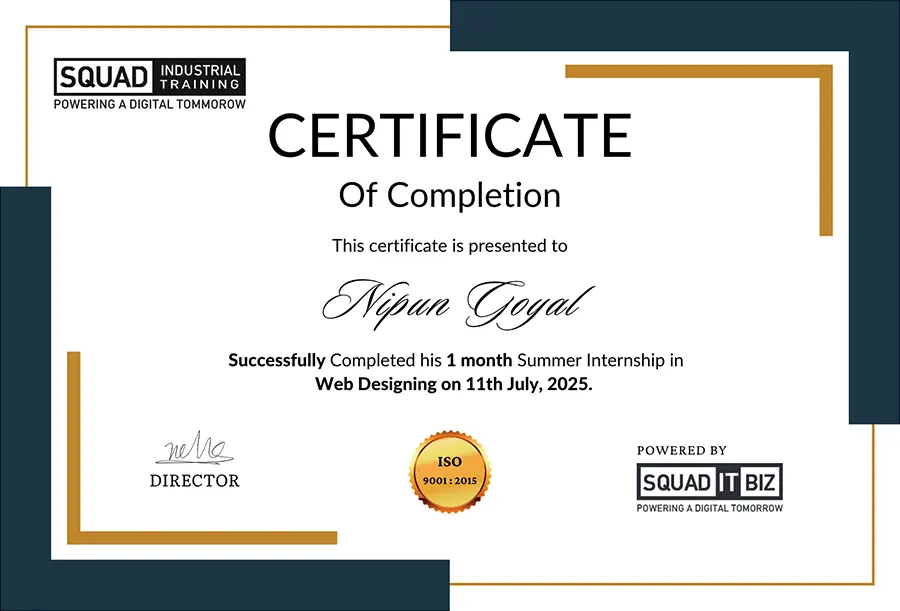
Certify your Learning
Certificate
Certificate

Start Your Learning Journey Today

Enroll now and gain industry-ready skills with expert guidance.

Frequently Asked Questions

What is WordPress?
WordPress is a beginner-friendly CMS that lets you build and manage websites easily using themes; plugins like the WordPress AI plugin, SEO tools; and performance features—no advanced coding required!
Which is the best place to learn advanced WordPress training with AI certificate in Zirakpur?
Squad Industrial Training offers Advanced WordPress training in Zirakpur with AI certificate, with live project exposure and hands-on learning. The program is designed to help students master WordPress development while integrating tools like an AI WordPress site builder for smarter website creation.
How long is the WordPress training training program?
The training is available in 3-month and 6-month options. Students can choose the duration based on their learning goals and availability.
What learning modes are available for this training?
The program offers both online and offline classes. Students can select their preferred mode for a flexible and comfortable learning experience when choosing a wordpress training near me.
Will I receive a certificate after completing the training?
Yes, students receive a training certificate upon successful completion. The certification validates practical skills in WordPress development and AI-assisted website optimization.
What language is used during the training sessions?
The training is conducted in Hindi and English. This ensures a clear understanding for students from different educational backgrounds who are searching for a wordpress training near me.
Does the training include practical exposure?
Yes, the program includes exposure to live international projects and real industry processes. Students work on hands-on assignments guided by digital experts.
Do I need prior experience to join this WordPress training?
No prior experience is required. The training is suitable for beginners, aspiring developers, professionals, and entrepreneurs looking for a wordpress training near me.
Does the training include internship opportunities?
Yes, a 45-day internship/industrial training option is also available. This allows students to gain real-world experience alongside structured training.
Are Flexible Payment Options Available?
Yes! Enrolling is simple with flexible payment plans. You can pay the full fee upfront or opt for convenient installments—2 payments over 3 months or 3 payments over 6 months—designed to fit your budget.